How Saathi AI Works Internally
A deep dive into the architecture powering Saathi AI — hybrid RAG, async workers, knowledge graphs, multi-provider LLMs, and real-time streaming.
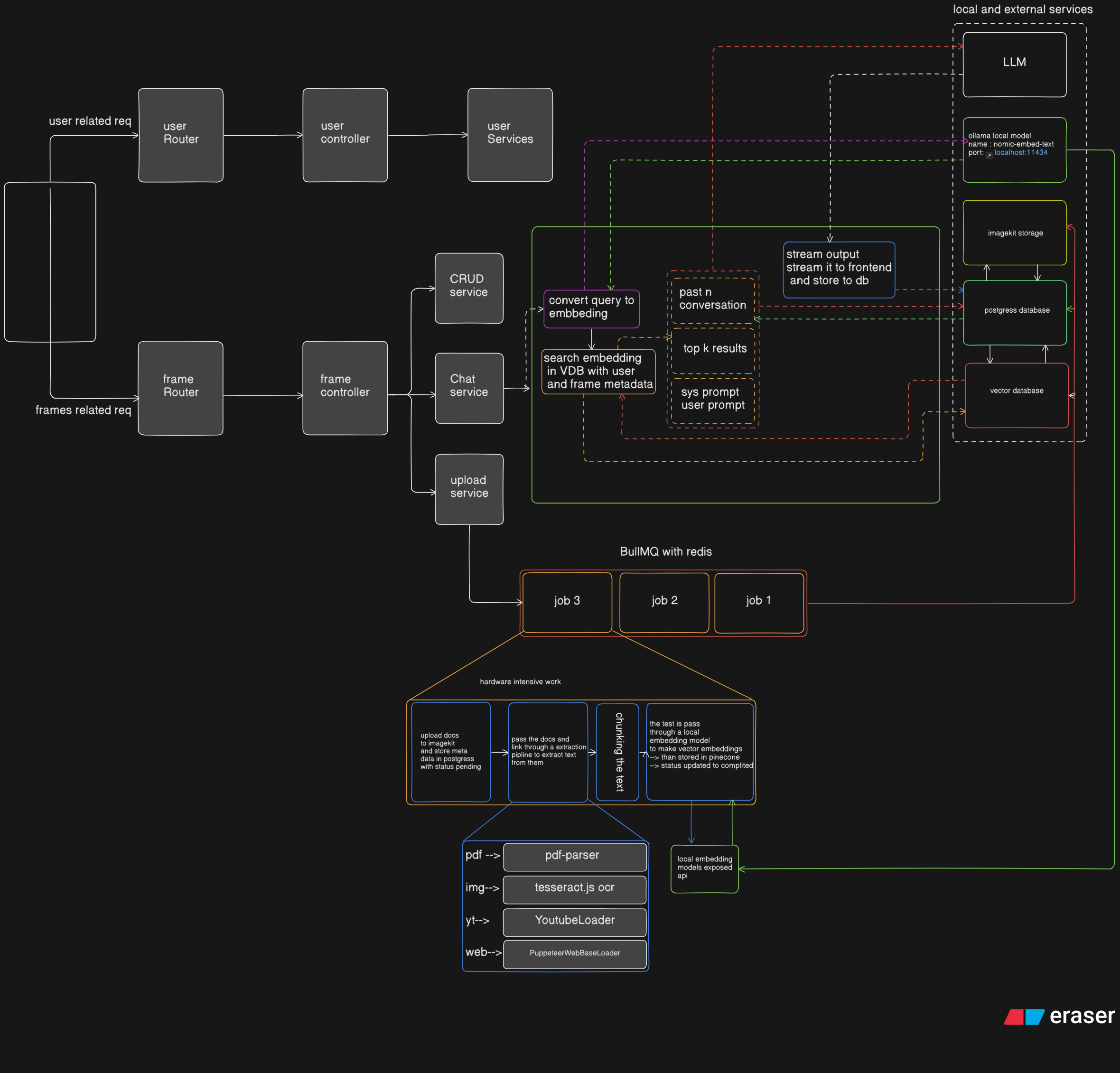
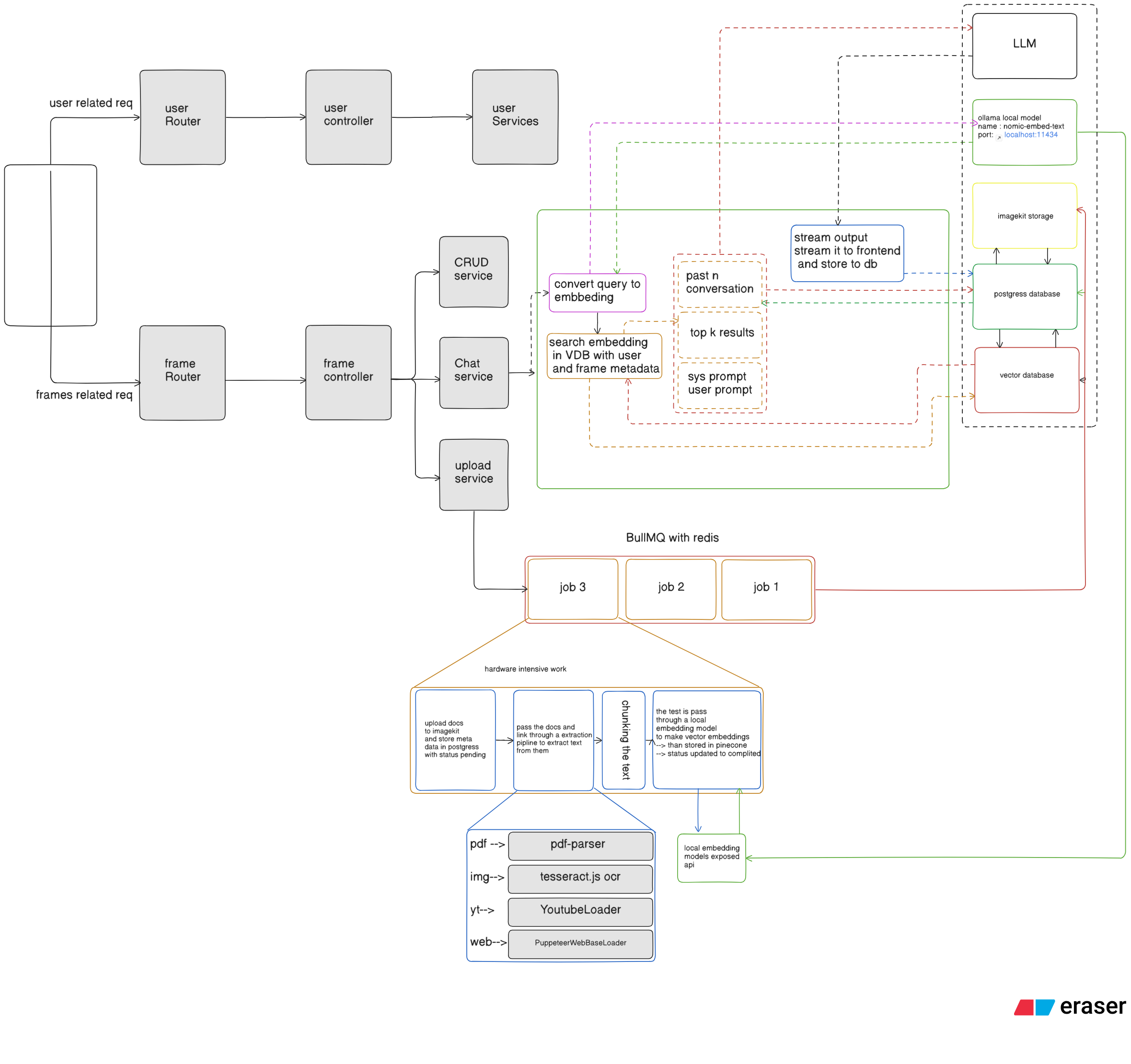
Retrieval-Augmented Generation is the backbone of Saathi AI. Instead of relying on a model's static memory, the system retrieves notebook-specific knowledge, blends it with conversation state, and then generates grounded answers in real time. The result is a backend that supports both study workflows and developer workflows while staying modular enough to scale.
Local Model Abstraction Layer
Instead of coupling the entire system directly to a third-party embedding API, Saathi AI uses a dedicated local abstraction for embeddings. In the current implementation, that abstraction is OllamaEmbeddings, which communicates with a locally running Ollama instance and exposes a simple embedDocuments and embedQuery interface to the rest of the application. The chat service, material worker, and retrieval layer do not need to care how embeddings are produced. They simply request vectors through a stable interface.
This separation keeps the system easy to evolve. If the local model changes, or if a different embedding backend is introduced later, the rest of the pipeline can stay mostly untouched.
Which embedding model is used?
The current implementation uses Nomic's nomic-embed-text through a locally hosted Ollama server. This gives the system a lightweight and production-friendly embedding path without coupling retrieval to a remote API provider.
export class OllamaEmbeddings implements EmbeddingsInterface {
  private model: string;
  private baseUrl: string;

  constructor(model = "nomic-embed-text", baseUrl = "http://localhost:11434") {
    this.model = model;
    this.baseUrl = baseUrl;
  }

  async embedDocuments(texts: string[]): Promise<number[][]> {
    const embeddings: number[][] = [];
    for (const text of texts) {
      const embedding = await this.getEmbedding(text);
      embeddings.push(embedding);
    }
    return embeddings;
  }

  async embedQuery(text: string): Promise<number[]> {
    return this.getEmbedding(text);
  }

  private async getEmbedding(text: string): Promise<number[]> {
    const response = await axios.post(`${this.baseUrl}/api/embeddings`, {
      model: this.model,
      prompt: text,
    });
    return response.data.embedding;
  }
}Intelligent Document Processing with Async Workers
Large documents, transcripts, and repositories should not block the request cycle. Saathi AI handles ingestion asynchronously using BullMQ backed by Redis. When a user uploads a file or adds a link, the API stores the material metadata first, marks it as pending, and then pushes a job into the material-processing queue.
That worker is responsible for extracting text, chunking it, generating embeddings, building summaries, and saving the final processed result. During processing, it emits live progress events so the frontend can keep the user informed.
Which OCR model is used?
The current system uses Tesseract.js for OCR. It is used when a study material is an image rather than a PDF or link.
How are YouTube, webpages, and GitHub repositories processed?
The ingestion worker supports more than plain documents:
- YouTube links are processed through transcript extraction, and the worker can also generate visual anchors from transcript items.
- Web pages are scraped and converted into text for chunking and retrieval.
- GitHub repositories are cloned, scanned, and turned into searchable repo content, with optional repo indexing for files, symbols, and relationships.
const materialWorker = new Worker(
  "material-processing",
  async (job) => {
    const { materialId, url, type, userId, frameId, provider, model } =
      job.data;

    let text;

    if (type === "pdf") {
      text = await extractPDF(url);
    } else if (type === "image") {
      text = await runOCR(url);
    } else if (type === "YTLink") {
      const ytData = await ytextractor(url);
      text = ytData.text;
    } else if (type === "webpageLink") {
      text = await webpageExtractor(url);
    } else if (type === "githubRepo") {
      const repoData = await githubExtractor(url);
      text = repoData.text;
    }

    if (!text) {
      throw new Error("No text extracted from the material.");
    }

    const docs = await textSplitter(text, type);
    await generateEmbeddings(docs, userId, frameId, materialId, type);

    const graphData = await extractEntitiesAndRelations(text, provider, model);
    await saveGraphData(frameId, materialId, graphData.nodes, graphData.edges);

    const aiSummary = await llmforSummaryService(
      text,
      provider,
      model,
      type === "githubRepo"
    );

    await db
      .update(study_material)
      .set({
        processed_status: "completed",
        ai_generated_summary: aiSummary,
        content: text.slice(0, 100000),
      })
      .where(eq(study_material.id, materialId));
  },
  {
    connection: { host: environment.redisHost, port: environment.redisPort },
    concurrency: 2,
  }
);This separation prevents upload-time blocking and opens the door to hardware-specific optimization later. CPU-heavy extraction can stay isolated from embedding-heavy or model-heavy tasks, and the same pattern scales naturally across multiple workers.
Chunking, Embeddings, and Vector Storage
After extraction, documents are split into chunks that preserve enough context for retrieval while remaining small enough for efficient search. Each chunk is enriched with notebook metadata such as user_id, frame_id, material_id, doc_type, and chunk_index.
That metadata becomes essential later: it lets the system retrieve only the chunks relevant to a specific user, notebook, or selected material instead of searching a global vector pool.
export const generateEmbeddings = async (
  docs: any,
  userId: string,
  frameId: string,
  materialId: string,
  type: string
) => {
  const enrichedDocs = docs.map((doc: any, i: number) => {
    const chunkId = `${userId}_${frameId}_${materialId}_${i}`;
    return {
      ...doc,
      metadata: {
        ...doc.metadata,
        user_id: userId,
        frame_id: frameId,
        material_id: materialId,
        doc_type: type,
        createdAt: new Date().toISOString(),
        chunk_index: i,
        chunk_id: chunkId,
      },
      id: chunkId,
    };
  });

  const vectorStore = await getVectorStore(5);
  await vectorStore.addDocuments(enrichedDocs);
};In the current backend, embeddings are stored in Pinecone, while the metadata and source material records live in PostgreSQL. That split keeps vector similarity search fast while structured data remains queryable through the relational database.
Hybrid Retrieval Beyond Pure Vector Search
One of the most important features in the current implementation is that retrieval is not limited to a plain top-k vector lookup. Saathi AI uses a hybrid pipeline that combines:
- vector search from Pinecone
- metadata-aware filtering by user, frame, and material
- optional multi-query retrieval for broader questions
- BM25 keyword rescoring
- Reciprocal Rank Fusion
- optional local re-ranking
- neighbor chunk expansion
- graph-based relational context from PostgreSQL
This means the assistant can answer both narrow factual questions and broader synthesis prompts more reliably. If a user asks a direct question, retrieval can stay focused. If the question is broad or conceptual, the system can widen the search, fuse multiple signals, and bring in graph context as relational evidence.
export const searchEmbeddings = async (
  query: string,
  userId: string,
  frameId: string,
  materialId?: string,
  materialIds?: string[],
  topK: number = 30
) => {
  const vectorStore = await getVectorStore();

  const filter: any = {
    user_id: userId,
    frame_id: frameId,
  };

  if (materialIds && materialIds.length > 0) {
    filter.material_id = { $in: materialIds };
  } else if (materialId) {
    filter.material_id = materialId;
  }

  return vectorStore.similaritySearch(query, topK, filter);
};This is also where the system becomes more than a basic RAG demo. It does not just retrieve chunks; it tries to retrieve the right chunks, in the right scope, with the right level of grounding for the user's intent.
Knowledge Graph Context for Relational Reasoning
Another core feature is the lightweight GraphRAG layer. During ingestion, the worker extracts entities and relationships from the source material and stores them in PostgreSQL. Later, when a user asks a question, the chat pipeline can query that graph to supplement vector retrieval with relational context.
This matters for questions that depend on structure rather than isolated facts, such as dependencies, workflows, concept maps, and how multiple ideas relate to one another.
const graphData = await extractEntitiesAndRelations(text, provider, model);
await saveGraphData(frameId, materialId, graphData.nodes, graphData.edges);Instead of treating a notebook like a bag of chunks, this lets the system recover part of the shape of the source knowledge.
Real-Time Token Streaming
For chat UX, Saathi AI uses Server-Sent Events to stream model output to the frontend token by token. That means the user does not wait for a giant response blob. They see the answer form in real time, along with citations and structured metadata when available.
export const chatInFrame = async (
  req: Request,
  res: Response,
  next: NextFunction
) => {
  const userId = (req as any).user?.id;
  const frameId = req.params.frameId;
  const query = req.query.query;
  const isRagEnabled = req.query.rag === "true";

  res.setHeader("Content-Type", "text/event-stream");
  res.setHeader("Cache-Control", "no-cache");
  res.setHeader("Connection", "keep-alive");
  res.flushHeaders?.();

  for await (const token of chatInFrameService(
    query as string,
    userId,
    frameId,
    isRagEnabled
  )) {
    res.write(`data: ${token}\n\n`);
  }

  res.write("event: done\ndata: end\n\n");
  res.end();
};The same turn is also persisted in PostgreSQL, so the system gets both real-time responsiveness and durable chat history. Separately, background workers publish progress updates through Socket.IO, which gives the product two distinct real-time channels: one for conversational streaming and one for job progress.
Adaptive Tutor Personalization
Saathi AI is not just a retrieval engine. A core product feature in the current implementation is frame-level personalization. The system analyzes recent behavior inside a notebook and generates a live learning snapshot that influences the prompt.
That snapshot includes signals such as:
- learning mode: conceptual, procedural, applied, or mixed
- learner state: warming up, steady, struggling, or accelerating
- support level and challenge level
- preferred surfaces such as visual, workspace, quiz, or flashcards
- weak areas, strong signals, and next best actions
This gives the LLM richer context than raw notebook text alone. Two users can ask similar questions against the same notebook and still get answers tuned to how they are learning.
Artifact Generation and Visual Learning
Another major feature is the artifact layer. The assistant is not limited to plain chat messages. It can generate and persist structured outputs such as documents, diagrams, and interface-like artifacts. These outputs are stored in the database and can be rendered as reusable workspace content rather than one-off text responses.
This is especially useful for:
- architecture diagrams
- visual lessons
- structured study aids
- generated reports and explainers
- reusable interface-style artifacts inside the workspace
The current system also includes a visual learning service that can generate Mermaid-based visual explanations and walkthroughs grounded in notebook context.
const result = await artifactService.upsertArtifact(
  userId,
  frameId,
  artifactId || null,
  {
    title,
    type,
    content,
    state,
  }
);This turns the assistant from a chatbot into a content-producing workspace.
Async Learning Features Beyond Chat
The current backend also supports a second asynchronous lane for learning features that are too heavy to run inline with chat. A separate BullMQ training-tasks queue handles generation flows like:
- quizzes
- flashcards
- briefings
- study guides
- mind maps
- x-ray analysis for image-based understanding
- architecture maps and code audits in developer notebooks
This is important because it keeps the chat loop fast while still enabling richer outputs that may require heavier generation or post-processing.
switch (type) {
  case "flashcards":
    result = await flashcardService.generateFlashcards(
      frameId,
      userId,
      history,
      provider,
      model
    );
    break;
  case "quiz":
    result = await quizService.generateQuiz(
      frameId,
      userId,
      history,
      provider,
      model,
      quizType,
      difficulty
    );
    break;
  case "briefing":
    result = await briefingService.generateBriefing(
      frameId,
      userId,
      provider,
      model
    );
    break;
  case "mindmap":
    result = await mindmapService.generateMindmap(
      frameId,
      userId,
      history,
      provider,
      model
    );
    break;
  case "architecture":
    result = await devFrameService.generateArchitectureMap(
      frameId,
      userId,
      provider,
      model
    );
    break;
}Job Scheduling and Reliability with BullMQ
BullMQ is the coordination layer that makes the async-first architecture practical. It decouples ingestion and long-running generation from the API layer, allows workers to run with their own concurrency, and makes failures easier to contain and retry.
In practice, this means a user can keep chatting while uploads are still processing, quizzes are still generating, or repository indexing is still running. The system does not need to serialize all work behind the request-response cycle.
Dev-Frame Repository Intelligence
Saathi AI also extends the same RAG approach into developer workflows. When a GitHub repository is added as a material, the backend can extract not just raw text but also file trees, symbols, route definitions, imports, schema relationships, and other lightweight code intelligence.
This makes developer notebooks more than document stores. They become searchable code workspaces where the assistant can answer architectural questions, inspect routes and schemas, and generate architecture maps or code audits from real repository context.
That is an important scaling idea in the product: the same retrieval and generation backbone powers both education and engineering use cases.
Persistence Layer and Data Flow
Saathi AI uses PostgreSQL for structured data, Pinecone for vector storage, ImageKit for uploaded files, and Redis for queues and caches. Chat history, notebook materials, artifacts, graph entities, summaries, assessments, and personalization signals all live in the persistence layer in forms optimized for their access patterns.
At the API layer, the system stays largely stateless. Context is reconstructed on demand from chat history, notebook memory, metadata filters, personalization snapshots, vector search, and graph lookups.
Scaling Strategy
Because the system is split into focused services and workers, individual parts can scale independently:
- more ingestion workers for heavy document throughput
- more training workers for quizzes and derived outputs
- stronger inference nodes for model-heavy workloads
- larger or distributed vector infrastructure for retrieval growth
- separate scaling paths for study notebooks and dev notebooks
This architecture can start on a single machine and evolve gradually without rewriting the core pipeline.
Observability and Performance
The current system exposes progress events from workers, stores durable material states, and surfaces queue activity through BullMQ tooling. On the retrieval side, the chat service also tracks decision points such as whether retrieval is needed, whether summary memory should be used, whether re-ranking should run, and how wide the search should be.
That kind of visibility is critical in RAG systems because retrieval quality problems often look like model problems from the outside.
Conclusion
Saathi AI demonstrates that a scalable RAG backend is not just about embedding documents and calling an LLM. A production-ready system needs asynchronous ingestion, metadata-aware retrieval, graph context, personalization, streaming, durable artifacts, and background learning workflows.
What makes this architecture valuable is not any one piece in isolation, but how those pieces reinforce one another. Local embeddings keep retrieval efficient, workers keep the app responsive, graph and metadata improve grounding, personalization improves teaching quality, and artifacts turn answers into reusable outputs. Together, these patterns move the system well beyond a simple chat-with-documents demo and toward a real intelligent workspace.